

Specialized software for businesses and medical practices
Online appointment booking with vacation schedule
Choose an available time
Select the reason and the person, find an available appointment and confirm the booking right away.
Canceling works online, and reminders are sent by email, messenger or the communication channel of your choice.
Data in Germany.
We process your business’s data in Germany, on our own servers.
On request we install the server on your premises and set everything up on it.

A click on an appointment shows on the right how often the customer has already been there, along with all other details that matter to you at a glance.
(sample data, no real personal data)
The sidebar shows who the customer is, how often they have been there and whether they are already waiting.
(simplified illustration, sample data, no real personal data)
(simplified illustration, sample data, no real personal data)
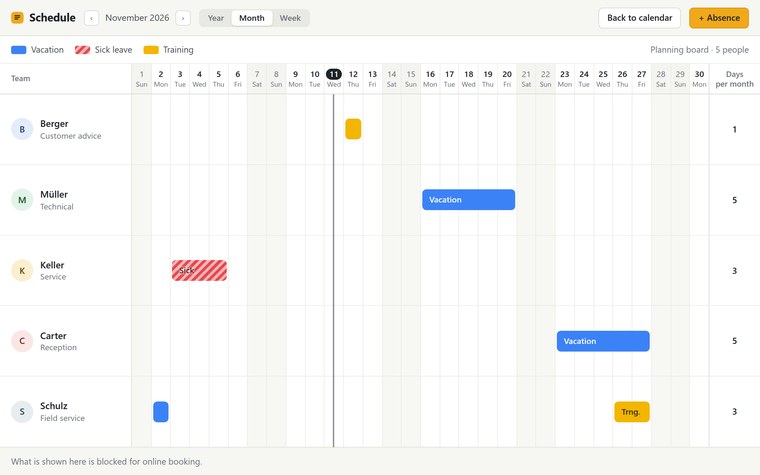
Whatever is entered here is blocked for online booking.
(sample data, no real personal data)
How it works
- Choose the reason
Book or cancel an appointment, then statutory insurance, private insurance or self-pay.
- Choose the person
Customers tap the person they want to see; anyone with no preference chooses “Any” for the earliest possible appointment.
- Choose an available appointment
The calendar shows only what is actually available.
- Enter details
First name, last name, mobile number, email, plus a note on the reason and up to five documents that go only to your team and are not stored.
- SMS code
A six-digit code sent to the mobile number confirms the booking; the appointment is then binding and can be added to a calendar.
For the team
- Calendar for the team. Week or day at a glance, appointments with reason and status, emergencies and blocked times with one click.
- Workload at a glance. You see immediately how heavily booked each team member is and can distribute new appointments fairly.
- The customer at one click. A click on an appointment shows how long the customer has been coming, when they were last there and how often, plus all other details that matter to you at a glance.
- Planning board for absences. Vacation, sick leave and training per person across the year, month or week; whatever is entered there stays blocked for online booking.
- Cancellations and reminders. Cancellation online with an SMS code, reminder before the appointment by email, messenger or the channel of your choice.
Contact
Get in touch with us
Write to us about what you need.
A few sentences are enough.
We will get back to you personally.
We are based between the Rhine-Main area and the Middle Rhine.
Anywhere in Germany we are happy to talk by video call or phone, and where a project calls for it, we come by in person.